A chat over TCP
A server that relays every line to all clients, two chat windows that connect to it, and a timer that polls the sockets so the windows never freeze. A real network program in one file.
What you will learn#
- the structure of a chat: one server, many clients,
- a text protocol with one message per line,
- why a window program must never wait for the network,
- reading the bytes that are available, and building lines from them,
- polling with a timer,
- testing network code with a pump and a short wait.
The idea#
The server listens on a port. Each client connects and sends lines such as Alice: Hello. The server sends every line it receives to all clients, including the sender, so everybody sees the same conversation in the same order. The protocol is the simplest possible: one message per line, the sender's name at the start. The tutorial Sockets explains sockets; here they are used in a window program.
The program#
# a chat over TCP - a server that relays lines, two clients, and a timer that polls the sockets
load "dotnet.ring"

using {
	"System"
	"System.IO"
	"System.Net"
	"System.Net.Sockets"
	"System.Threading"
	"System.Drawing"
	"System.Windows.Forms"
}

oForm = ""
oServer = ""
aClients = []             # the two chat clients
aLogs = []                # the two text boxes that show the conversation
aInputs = []              # the two text boxes where the user types
oTimer = ""

func main

	oServer = new ChatServer()
	nPort = oServer.start()
	oForm = uiForm("Chat on port " + nPort,620,380)
	cNames = ["Alice","Bob"]
	for nIndex = 1 to 2
		nLeft = 10 + (nIndex - 1) * 300
		uiLabel(oForm,cNames[nIndex],nLeft,8,280,20)
		oLog = uiMemo(oForm,nLeft,30,290,250)
		oLog.ReadOnly = True
		aLogs + oLog
		oInput = uiTextBox(oForm,nLeft,290,200,24)
		aInputs + oInput
		uiButton(oForm,"Send",nLeft + 210,288,80,28,"sendFrom(" + nIndex + ")")
		aClients + new ChatClient(cNames[nIndex],nPort)
	next
	# the timer asks the server and the clients if something has arrived (Ring has one thread: nothing waits)
	oTimer = uiTimer(100,"pump()")
	oTimer.Start()
	uiRun(oForm)
	oTimer.Stop()
	for oClient in aClients
		oClient.close()
	next
	oServer.stop()

# the user pressed Send in window nIndex: send the text to the server
func sendFrom nIndex

	cText = trim(aInputs[nIndex].Text)
	if cText != ""
		aClients[nIndex].send(cText)
		aInputs[nIndex].Text = ""
	ok

# one round: the server relays what it has received, and each client shows what it has received
func pump

	oServer.poll()
	for nIndex = 1 to 2
		aNew = aClients[nIndex].poll()
		for cLine in aNew
			aLogs[nIndex].AppendText(cLine + windowsnl())
		next
	next

# A StreamReader waits (blocks) when no data has arrived, and the window would freeze. This reader asks first: it takes only the bytes
# that are already there (DataAvailable), builds lines from them, and keeps an unfinished line for the next call.
class LineReader

	oStream = ""
	cPartial = ""

	func init oNetworkStream

		oStream = oNetworkStream
		return self

	func lines

		aList = []
		while oStream.DataAvailable
			nByte = oStream.ReadByte()
			if nByte = 10                         # the end of a line
				aList + cPartial
				cPartial = ""
			but nByte != 13
				cPartial += char(nByte)           # a Ring text is a list of bytes: UTF-8 text stays correct
			ok
		end
		return aList

# ---------------------------------------------------------------- the server

# The server accepts connections and sends every line it receives to ALL clients (the sender included).
class ChatServer

	oListener = ""
	aConnections = []         # [TcpClient, LineReader, StreamWriter]

	func init

		return self

	func start

		oListener = new TcpListener(new IPAddress().Loopback,0)
		oListener.Start(NULL)
		return oListener.LocalEndpoint.Port

	func count

		return len(aConnections)

	# called often: accept new clients, read the lines that are waiting, relay them
	func poll

		while oListener.Pending()
			oSocket = oListener.AcceptTcpClient()
			oStream = oSocket.GetStream()
			oWriter = new StreamWriter(oStream)
			oWriter.AutoFlush = True
			oReader = new LineReader(oStream)
			aConnections + [oSocket,oReader,oWriter]
		end
		aReceived = []
		for aConnection in aConnections
			oReader = aConnection[2]
			aNew = oReader.lines()              # the lines that arrived
			for cLine in aNew
				aReceived + cLine
			next
		next
		for cLine in aReceived
			for aConnection in aConnections
				aConnection[3].WriteLine(cLine)
			next
		next

	func stop

		for aConnection in aConnections
			aConnection[3].Dispose()
		next
		aConnections = []
		oListener.Stop()

# ---------------------------------------------------------------- a client

class ChatClient

	cName = ""
	oSocket = ""
	oReader = ""
	oWriter = ""
	aSent = []

	func init cWho, nPort

		cName = cWho
		oSocket = new TcpClient()
		oSocket.Connect([ :hostname = "127.0.0.1", :port = nPort ])
		oStream = oSocket.GetStream()
		oReader = new LineReader(oStream)
		oWriter = new StreamWriter(oStream)
		oWriter.AutoFlush = True
		return self

	# the line that is sent to the server starts with the name: "Alice: Hello"
	func send cText

		oWriter.WriteLine(cName + ": " + cText)
		aSent + cText

	func sent

		return aSent

	# the lines that have arrived since the last call
	func poll

		return oReader.lines()

	func close

		oWriter.Dispose()
		oSocket.Close()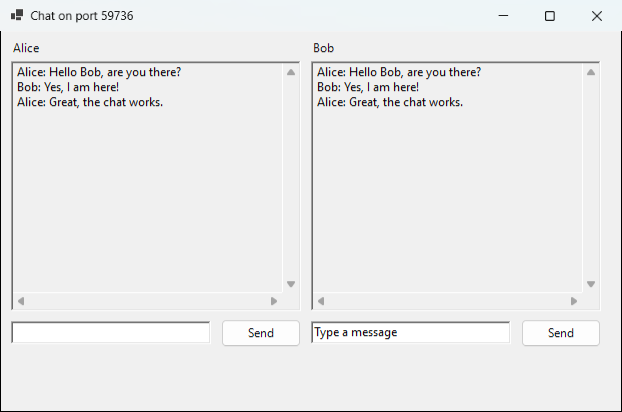
How it works#
Never wait in a window program#
StreamReader.ReadLine() waits until a whole line arrives. In a window program that means the window freezes: it cannot repaint or answer clicks. Ring has one thread, so waiting is not allowed. The solution has two parts:
- Ask first.
NetworkStream.DataAvailablesays whether bytes are waiting.LineReader.lines()reads only the bytes that are there (ReadByte), adds them to a buffer, and returns a line each time it sees a line feed (byte 10). An unfinished line stays incPartialuntil the next call. - Ask often. A
uiTimercallspump()every 100 milliseconds: the server accepts new connections (Pending()), reads and relays the lines, and each client shows what it received.
A Ring text is a list of bytes, so cPartial += char(nByte) rebuilds UTF-8 text correctly, also for non-English letters.
The classes#
LineReaderturns a stream into lines without waiting.ChatServerkeeps a list of connections[socket, reader, writer];poll()accepts, reads, and writes each received line to every connection.ChatClientconnects, sends"Name: text"and returns the lines that arrived.
The two windows live in the same program only to make the tutorial easy to run; the classes would work the same in different programs on different computers. Give the server's address instead of 127.0.0.1.
Testing#
The self test sends a line from Alice and calls waitForText, which pumps up to 50 times with a 20 ms sleep until both windows show the line — network messages arrive a little later, so a test must wait for them instead of checking at once. Then it checks that Bob's line arrives in both windows, that the server has two clients, and that an empty text is not sent.
The checks of this program are in a separate file, selftest/ch12_chat.ring:
# the checks of ch12_chat.ring: run with  ring ch12_chat.ring --selftest  (the program loads this file and runs selfTest() once its window is shown)

# wait (at most about a second) until the logs have changed: network messages arrive a little later
func waitForText cText

	for nTry = 1 to 50
		pump()
		if substr(aLogs[1].Text,cText) > 0 and substr(aLogs[2].Text,cText) > 0
			return True
		ok
		new Thread().Sleep(20)
	next
	return False

func selfTest

	oTimer.Stop()
	aInputs[1].Text = "Hello Bob"
	sendFrom(1)
	dnAssert("Bob received Alice's line",waitForText("Alice: Hello Bob"),True)
	dnAssert("Alice sees her own line too",substr(aLogs[1].Text,"Alice: Hello Bob") > 0,True)
	aInputs[2].Text = "Hi Alice"
	sendFrom(2)
	dnAssert("both windows show Bob's line",waitForText("Bob: Hi Alice"),True)
	dnAssert("the server has two clients",oServer.count(),2)
	aInputs[1].Text = "   "
	sendFrom(1)
	dnAssert("an empty line is not sent",len(aClients[1].sent()),1)

# ---------------------------------------------------------------- reading lines without waiting
What you learned#
- server and clients with
TcpListenerandTcpClient, - a line-based protocol,
- polling with a timer instead of waiting,
DataAvailableandReadByte,- testing asynchronous code with a bounded wait.
Exercises#
- Show a list of the connected names and tell everybody when somebody joins.
- Add a third window.
- Send a private message with
/to Bob text: the server must send it only to Bob. - Close a client and make the server remove the dead connection from its list.
Where to go next#
This was the last tutorial of the chapter Projects with windows. The next chapter is Libraries and packages: it starts with Callbacks and events. The Tutorials page lists all the chapters, and you can start any of them.