A project: a quiz
A quiz asks questions, checks the answers, gives feedback, shows a score and remembers the best scores. This project keeps the questions as data, uses radio buttons, lets one button do two jobs, and saves the scores in a file.
What you will learn#
- questions as data: a list of
[question, answers, right answer], - an array of
RadioButtoncontrols made in a loop, - a button with two jobs (Check and then Next) and a state flag,
- feedback that shows the right answer,
- a score screen and a saved list of best scores,
- a test that plays the quiz.
This is the pattern of any wizard or exam program: a list of steps, a current step, a state, and a button that moves on.
The program#
# a project: a quiz - questions in data, radio buttons, a score, feedback, a result screen and a saved list of best scores
load "dotnet.ring"

using {
	"System"
	"System.IO"
	"System.Drawing"
	"System.Windows.Forms"
}

# The questions are DATA: each is [ the question, [ the four answers ], the number of the right answer ]. A new question is a new line in
# the list, and the program does not change.
aQuestions = [
	[ "Which language is used with this package?", [ "Ring","Pascal","Lua","Go" ], 1 ],
	[ "What does a byte[] become in Ring?", [ "A list","A text of bytes","A number","An object" ], 2 ],
	[ "How is a .NET enum written in Ring?", [ "As a number","As a text","As a list","It cannot be used" ], 2 ],
	[ "Which function calls a static method?", [ "dnStatic","dnCall","dnRun","dnMethod" ], 1 ]
]

# controls and state that the event code uses are global variables
oForm = ""
oQuestion = ""
aAnswers = []
oNext = ""
oFeedback = ""
oProgress = ""
nCurrent = 0                      # the question that is shown (from 1)
nScore = 0
lAnswered = False                 # was this question already checked?
cScoreFile = ""

func main

	cScoreFile = new Path().Combine([ new Path().GetTempPath(), "ringdotnet-quiz-scores.txt" ])
	oForm = uiForm("Quiz",470,300)
	oProgress = uiLabel(oForm,"",15,12,430,22)
	oQuestion = uiLabel(oForm,"",15,40,430,40)
	for i = 1 to 4
		oRadio = new RadioButton()
		oRadio.Location = new Point(25,86 + (i - 1) * 28)
		oRadio.Size = new Size(400,24)
		oForm.Controls.Add(oRadio)
		aAnswers + oRadio
	next
	oFeedback = uiLabel(oForm,"",15,205,430,24)
	oNext = uiButton(oForm,"Check",15,235,120,32,"nextStep()")

	showQuestion(1)
	uiRun(oForm)
	cleanUp()

func showQuestion n

	nCurrent = n
	lAnswered = False
	aQuestion = aQuestions[n]
	oProgress.Text = "Question " + n + " of " + len(aQuestions)
	oQuestion.Text = aQuestion[1]
	for i = 1 to 4
		aAnswers[i].Text = aQuestion[2][i]
		aAnswers[i].Checked = False
		aAnswers[i].Enabled = True
	next
	oFeedback.Text = ""
	oNext.Text = "Check"

# which radio button is on? 0 when none
func chosen

	for i = 1 to 4
		if aAnswers[i].Checked
			return i
		ok
	next
	return 0

# The button has two jobs. First click: check the answer and show the right one. Second click: the next question, or the result.
func nextStep

	if not lAnswered
		checkAnswer()
	else
		if nCurrent < len(aQuestions)
			showQuestion(nCurrent + 1)
		else
			showResult()
		ok
	ok

func checkAnswer

	nChosen = chosen()
	if nChosen = 0
		oFeedback.Text = "Choose an answer first"
		return
	ok
	nRight = aQuestions[nCurrent][3]
	if nChosen = nRight
		nScore++
		oFeedback.Text = "Right!"
	else
		oFeedback.Text = "Not quite: the answer is " + aQuestions[nCurrent][2][nRight]
	ok
	for i = 1 to 4
		aAnswers[i].Enabled = False                  # no change after the check
	next
	lAnswered = True
	if nCurrent < len(aQuestions)
		oNext.Text = "Next"
	else
		oNext.Text = "Result"
	ok

# the result: the score, a saved line for the list of scores, and the best three
func showResult

	oQuestion.Text = "Your score: " + nScore + " of " + len(aQuestions)
	oProgress.Text = "Finished"
	for i = 1 to 4
		aAnswers[i].Visible = False
	next
	new File().AppendAllText([ :path = cScoreFile, :contents = "" + nScore + nl ])
	aBest = bestScores(3)
	cText = "Best scores:"
	for nValue in aBest
		cText += " " + nValue
	next
	oFeedback.Text = cText
	oNext.Enabled = False

# the best scores of the file, the highest first
func bestScores nCount

	aScores = []
	if new File().Exists(cScoreFile)
		aLines = new File().ReadAllLines(cScoreFile).toList()
		for cLine in aLines
			if trim(cLine) != ""
				aScores + (0 + trim(cLine))
			ok
		next
	ok
	aScores = reverse(sort(aScores))
	aBest = []
	for i = 1 to min(nCount,len(aScores))
		aBest + aScores[i]
	next
	return aBest

func cleanUp

	if new File().Exists(cScoreFile)
		new File().Delete(cScoreFile)
	ok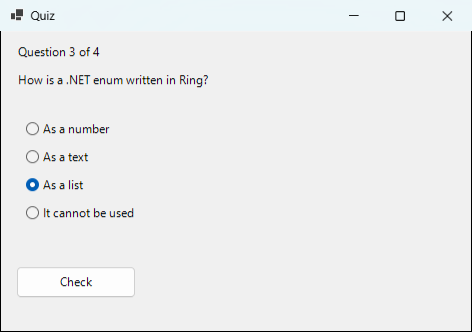
How it works#
The questions are data#
aQuestions is a list at the top of the program. Each entry has the text of the question, a list of four answers and the number of the right answer. Adding a question means adding a line; the program does not change, and the list could be read from a file or a JSON text (the tutorial JSON and XML).
Radio buttons in a loop#
The four RadioButton controls are made in a loop and kept in the list aAnswers, so the code can say aAnswers[i].Text = ... for all of them. Radio buttons that have the same parent are one group, so choosing one turns the others off. chosen() returns the number of the button that is on, or 0.
One button, two jobs#
The button says Check at first. The first click checks the answer: it adds to the score, shows Right! or the right answer, disables the buttons so that the answer cannot be changed, and sets lAnswered. The button now says Next, and the second click shows the next question, or the result after the last one (the button says Result then). The flag lAnswered tells which job the click has. A click before any answer is chosen shows Choose an answer first and changes nothing.
The result and the best scores#
showResult writes the score, hides the radio buttons and appends the score as a line to a file with File.AppendAllText. bestScores reads the lines, makes numbers, sorts them with sort and reverse and keeps the first three. The scores stay between runs because they are in a file. (The file is in the folder for temporary files, and the program deletes it at the end of the test so that the output is the same each time.)
The test plays#
The function play(n) chooses answer n and clicks the button. The test answers the questions: nothing chosen, right, wrong (and the feedback names the right answer), right, right, and the score is 3 of 4. It checks the progress text, the feedback, the button text and the best scores. No mouse is needed, and the test is written in the words of the quiz.
The checks of this program are in a separate file, selftest/ch12_quiz.ring:
# the checks of ch12_quiz.ring: run with  ring ch12_quiz.ring --selftest  (the program loads this file and runs selfTest() once its window is shown)

# the test plays: it chooses the answers like a user and clicks the button
func play nAnswer

	if nAnswer > 0
		aAnswers[nAnswer].Checked = True
	ok
	oNext.PerformClick()

func selfTest

	cleanUp()
	dnAssert("the first question",oQuestion.Text,"Which language is used with this package?")
	dnAssert("the progress",oProgress.Text,"Question 1 of 4")

	# nothing chosen: the program asks for an answer and stays
	play(0)
	dnAssert("choose first",oFeedback.Text,"Choose an answer first")

	# right answer
	play(1)
	dnAssert("right",oFeedback.Text,"Right!")
	dnAssert("the button says Next",oNext.Text,"Next")
	play(0)                                            # next question

	# wrong answer: the feedback says which is right
	dnAssert("question 2",oProgress.Text,"Question 2 of 4")
	play(3)
	dnAssert("wrong",oFeedback.Text,"Not quite: the answer is A text of bytes")
	play(0)

	# the other two right
	play(2)
	play(0)
	play(1)
	dnAssert("the last button",oNext.Text,"Result")
	play(0)

	dnAssert("the score",oQuestion.Text,"Your score: 3 of 4")
dnAssert("the best scores",oFeedback.Text,"Best scores: 3")The program sets the state in the functions (showQuestion, checkAnswer) and never in the event code, which is only nextStep(). This keeps the events short and the test simple.
What you learned#
- questions as data,
- radio buttons made in a loop,
- one button with a state,
- saving scores in a file,
- a test that plays through the whole quiz.
Exercises#
- Show the questions in a random order (
randomin a loop, or shuffle the list first). - Add a time limit for each question with a timer (the tutorial Timers and progress).
- Read the questions from a JSON file and write a second file with more questions.
- Show the list of all the scores, not only the best three, with the date of each.