A project: a to-do list that remembers
A complete small application — add, tick and remove tasks, see how many are done, and find them again the next time the program starts. Windows Forms, JSON and files together.
What you will learn#
- planning a small application: data, window, behavior, saving,
- a
CheckedListBox, - saving to JSON and loading it again,
- keeping a window and its data in step.
The design#
| Part | Decision |
|---|---|
| Data | the tasks live in the list control itself; each has a text and a done flag |
| Window | a text box and Add / Remove buttons on top, the list in the middle, a status line at the bottom |
| Behavior | Add ignores blank text; clicking an item ticks it; the status says "n of m done" |
| Saving | after every change the tasks are written to a JSON file; at start-up the file is read |
The program#
# a project - a to-do list that remembers its tasks (Windows Forms + JSON + files)
load "dotnet.ring"

using {
	"System"
	"System.IO"
	"System.Text.Json"
	"System.Drawing"
	"System.Windows.Forms"
}

oForm = ""
oNew = ""
oTasks = ""
oStatus = ""
cFile = ""
lLoading = False

func main

	# the tasks are saved here (a test uses a temporary file)
	cFile = new Path().Combine([new Path().GetTempPath(),"ringdotnet_todo-tasks.json"])
	if uiSelfTest()
		cFile = new Path().Combine([new Path().GetTempPath(),"ringdotnet_todo-test.json"])
		if new File().Exists(cFile)
			new File().Delete(cFile)
		ok
	ok

	oForm = uiForm("My tasks",360,320)

	# The window: a text box and a button on top, the list in the middle, a status line at the bottom.
	# (The control that fills is added FIRST: see the tutorial "A small text editor".)
	oTasks = new CheckedListBox() {
		Dock = "Fill"
		CheckOnClick = True
		setMouseUpEvent("tasksChanged()")           # after a click the state of the item is up to date
	}
	oForm.Controls.Add(oTasks)
	oTop = uiPanel(oForm,0,0,360,36)
	oTop.Dock = "Top"
	oNew = uiTextBox(oTop,8,6,230,24)
	uiButton(oTop,"Add",246,5,50,26,"addTask()")
	uiButton(oTop,"Remove",300,5,56,26,"removeTask()")
	oStatus = uiLabel(oForm,"",0,0,360,22)
	oStatus.Dock = "Bottom"

	loadTasks()
	refreshStatus()

	oForm.setFormClosingEvent("saveTasks()")
	uiRun(oForm)

func addTask

	cText = trim(oNew.Text)
	if cText = ""
		return
	ok
	oTasks.Items.Add([ :item = cText, :isChecked = False ])
	oNew.Text = ""
	saveTasks()
	refreshStatus()

func removeTask

	nIndex = oTasks.SelectedIndex
	if nIndex >= 0
		oTasks.Items.RemoveAt(nIndex)
		saveTasks()
		refreshStatus()
	ok

func tasksChanged

	saveTasks()
	refreshStatus()

func refreshStatus

	nDone = oTasks.CheckedItems.Count
	oStatus.Text = "  " + nDone + " of " + oTasks.Items.Count + " done"

# ---------------------------------------------------------------- saving and loading (JSON: [[1 or 0, "text"], ...])

func saveTasks

	if lLoading
		return
	ok
	aList = []
	for nIndex = 0 to oTasks.Items.Count - 1
		aList + [oTasks.GetItemChecked(nIndex),oTasks.Items.Item(nIndex)]          # [done, text]
	next
	cJson = new JsonSerializer().Serialize(aList)
	new File().WriteAllText([ :path = cFile, :contents = cJson ])

func loadTasks

	if not new File().Exists(cFile)
		return
	ok
	lLoading = True
	oDocument = new JsonDocument().Parse(new File().ReadAllText(cFile))
	oRoot = oDocument.RootElement
	nLastIndex = oRoot.GetArrayLength() - 1
	for nIndex = 0 to nLastIndex
		oTask = oRoot.Item(nIndex)
		oTasks.Items.Add([ :item = oTask.Item(1).GetString(), :isChecked = oTask.Item(0).GetInt32() = 1 ])
	next
	oDocument.Dispose()
	lLoading = False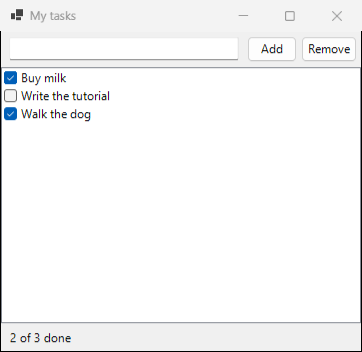
How it works#
The window#
Remember the tutorial A small text editor: the control that fills the window is added first, then the top panel and the status label (the helpers uiPanel, uiLabel and Dock do the rest). CheckOnClick = True makes one click tick or untick an item.
Add and remove#
addTask trims the text, ignores a blank one, adds Items.Add([ :item = text, :isChecked = False ]) (the second parameter is the initial checked state), clears the text box, saves and refreshes the status. removeTask removes the selected item (SelectedIndex is -1 when nothing is selected).
Reacting to a tick#
setMouseUpEvent("tasksChanged()") runs after the click, when the item's state is already up to date; the function saves and refreshes the status line. (The ItemCheck event runs before the state changes, which makes a status line show the old number.)
Saving as JSON#
The file holds a list of lists, one [done, text] per task: [[1,"Buy milk"],[0,"Write the tutorial"]]. JsonSerializer.Serialize(aList) writes it, and loading uses JsonDocument: GetArrayLength(), Item(i), GetInt32(), GetString().
Starting and stopping#
loadTasks runs before the window is shown. setFormClosingEvent("saveTasks()") saves once more when the window closes. While loading, a flag lLoading stops saveTasks from rewriting the file in the middle of the loading.
Testing#
selfTest adds tasks, ticks one, saves, clears the list, loads again and checks the contents, the JSON text and the status. It uses a separate file name when started with --selftest, so that it never touches your real list.
The checks of this program are in a separate file, selftest/ch12_todo.ring:
# the checks of ch12_todo.ring: run with  ring ch12_todo.ring --selftest  (the program loads this file and runs selfTest() once its window is shown)

func selfTest

	oNew.Text = "Buy milk"
	addTask()
	oNew.Text = "Write the tutorial"
	addTask()
	oNew.Text = "   "
	addTask()                                         # blank: ignored
	dnAssert("two tasks",oTasks.Items.Count,2)
	oTasks.SetItemChecked(0,True)
	saveTasks()
	refreshStatus()
	dnAssert("status",oStatus.Text,"  1 of 2 done")
	# the file holds the tasks
	dnAssert("saved as JSON",new File().ReadAllText(cFile),'[[1,"Buy milk"],[0,"Write the tutorial"]]')
	# a second load shows the same tasks
	oTasks.Items.Clear()
	loadTasks()
	dnAssert("loaded again",oTasks.Items.Count,2)
	dnAssert("the checked state",oTasks.GetItemChecked(0),True)
	oTasks.SelectedIndex = 1
	removeTask()
	dnAssert("removed",oTasks.Items.Count,1)
	new File().Delete(cFile)
What you learned#
- design first: data, window, behavior, saving,
CheckedListBox, events after a click,- JSON for saving the tasks as a list of [done, text] pairs,
- a flag to avoid saving while loading,
- tests that use their own file.
Exercises#
- Show the done tasks in gray (use
DrawItem, or simply move done tasks to the bottom). - Add Clear done that removes all ticked tasks.
- Save to the user's documents folder (
Environment.GetFolderPath("MyDocuments")). - Add a due date to each task and sort by it.
The full-size version is the TodoList application.