Watching sorting algorithms
Sorting is the classic example of an algorithm. This lesson records the work of three algorithms — bubble, selection and insertion — and replays it on a canvas, one step per timer tick, while counting comparisons and swaps.
What you will learn#
- how bubble sort, selection sort and insertion sort work,
- recording work as a list of steps and replaying it with a timer,
- drawing bars on a canvas and highlighting the two that are touched,
- counting comparisons and swaps to compare algorithms,
- a generator of random numbers with a fixed start.
The program#
# watching sorting algorithms - an animation, a timer and counting the work
load "dotnet.ring"

using {
	"System.Drawing"
	"System.Windows.Forms"
}

C_COUNT = 36
C_BAR = 12
C_HEIGHT = 300

oForm = ""
oPicture = ""
oCanvas = ""
oAlgorithm = ""
oInfo = ""
oTimer = ""
aValues = []              # the bars as they are shown now
aSteps = []               # the work of the algorithm: ["compare", i, j] or ["swap", i, j]
nStep = 0
nCompares = 0
nSwaps = 0
nSeed = 12345
aHot = []                 # the two bars that are touched by the step being shown

func main

	oForm = uiForm("Sorting",C_COUNT * C_BAR + 30,C_HEIGHT + 100)
	oPicture = uiPictureBox(oForm,5,5,C_COUNT * C_BAR,C_HEIGHT)
	oCanvas = new UiCanvas(oPicture)
	oAlgorithm = uiComboBox(oForm,10,C_HEIGHT + 20,130,["Bubble sort","Selection sort","Insertion sort"])
	uiButton(oForm,"Shuffle",150,C_HEIGHT + 18,80,28,"shuffle()")
	uiButton(oForm,"Sort",240,C_HEIGHT + 18,80,28,"startSorting()")
	oInfo = uiLabel(oForm,"",10,C_HEIGHT + 55,400,22)
	oTimer = uiTimer(15,"showStep()")
	shuffle()
	uiRun(oForm)

# a small random number generator with a fixed start, so that every run shows the same bars
func nextRandom nLimit

	nSeed = (nSeed * 1103515245 + 12345) % 2147483648
	return (floor(nSeed / 65536) % nLimit) + 1

func shuffle

	oTimer.Stop()
	aValues = []
	for nI = 1 to C_COUNT
		aValues + nI
	next
	for nI = C_COUNT to 2 step -1
		nJ = nextRandom(nI)
		aTemp = aValues[nI]
		aValues[nI] = aValues[nJ]
		aValues[nJ] = aTemp
	next
	aSteps = []
	nStep = 0
	nCompares = 0
	nSwaps = 0
	aHot = []
	oInfo.Text = "Press Sort"
	draw()

# the algorithms only RECORD what they do on a copy; the timer replays it step by step
func startSorting

	oTimer.Stop()
	aWork = aValues
	aSteps = []
	nStep = 0
	nCompares = 0
	nSwaps = 0
	switch oAlgorithm.SelectedIndex
	on 0
		bubbleSort(aWork)
	on 1
		selectionSort(aWork)
	on 2
		insertionSort(aWork)
	off
	oTimer.Start()

func bubbleSort aWork

	for nEnd = len(aWork) to 2 step -1
		for nI = 1 to nEnd - 1
			aSteps + ["compare",nI,nI + 1]
			if aWork[nI] > aWork[nI + 1]
				aTemp = aWork[nI]
				aWork[nI] = aWork[nI + 1]
				aWork[nI + 1] = aTemp
				aSteps + ["swap",nI,nI + 1]
			ok
		next
	next

func selectionSort aWork

	for nI = 1 to len(aWork) - 1
		nMin = nI
		for nJ = nI + 1 to len(aWork)
			aSteps + ["compare",nMin,nJ]
			if aWork[nJ] < aWork[nMin]
				nMin = nJ
			ok
		next
		if nMin != nI
			aTemp = aWork[nI]
			aWork[nI] = aWork[nMin]
			aWork[nMin] = aTemp
			aSteps + ["swap",nI,nMin]
		ok
	next

func insertionSort aWork

	for nI = 2 to len(aWork)
		nJ = nI
		while nJ > 1
			aSteps + ["compare",nJ - 1,nJ]
			if aWork[nJ - 1] > aWork[nJ]
				aTemp = aWork[nJ]
				aWork[nJ] = aWork[nJ - 1]
				aWork[nJ - 1] = aTemp
				aSteps + ["swap",nJ - 1,nJ]
				nJ--
			else
				exit
			ok
		end
	next

# show the next recorded step (the timer calls this)
func showStep

	if nStep >= len(aSteps)
		oTimer.Stop()
		aHot = []
		oInfo.Text = "Sorted: " + nCompares + " comparisons, " + nSwaps + " swaps"
		draw()
		return
	ok
	nStep++
	aStep = aSteps[nStep]
	aHot = [aStep[2],aStep[3]]
	if aStep[1] = "compare"
		nCompares++
	else
		nSwaps++
		aTemp = aValues[aStep[2]]
		aValues[aStep[2]] = aValues[aStep[3]]
		aValues[aStep[3]] = aTemp
	ok
	oInfo.Text = oAlgorithm.Text + ": " + nCompares + " comparisons, " + nSwaps + " swaps"
	draw()

func draw

	oCanvas.clear("White")
	for nI = 1 to len(aValues)
		nHeight = aValues[nI] * (C_HEIGHT - 10) / C_COUNT
		cColor = "SteelBlue"
		if find(aHot,nI) > 0
			cColor = "OrangeRed"
		ok
		oCanvas.fillRect((nI - 1) * C_BAR + 1,C_HEIGHT - nHeight,C_BAR - 2,nHeight,cColor)
	next
	oCanvas.show()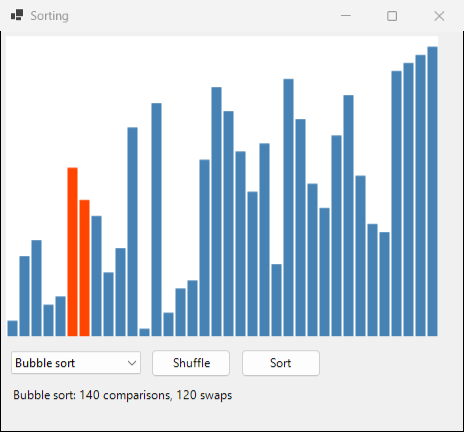
How it works#
Record, then replay#
A sorting algorithm is a loop that finishes in a moment: you could not see it. So the three functions bubbleSort, selectionSort and insertionSort work on a copy of the bars and, instead of drawing, record each step in aSteps: ["compare", 3, 4] or ["swap", 3, 4]. The timer then calls showStep every 15 milliseconds; each call takes the next recorded step, applies a swap to the bars on screen, adds to the counters and redraws. This separation — computing in one place and showing in another — also makes the self test easy: it runs all the steps without waiting and checks the result.
The three algorithms#
| Algorithm | Idea | Work |
|---|---|---|
| Bubble sort | compare neighbors and swap them if they are in the wrong order; repeat, and the biggest bar "bubbles" to the end | many comparisons and many swaps |
| Selection sort | find the smallest of the rest and swap it to the front | many comparisons, at most n − 1 swaps |
| Insertion sort | take the next bar and slide it left until it is in the right place (like sorting playing cards in your hand) | fast when the data is already nearly sorted |
Press Sort with each algorithm on the same bars (Shuffle makes a new order) and watch the counters at the bottom. For 36 bars bubble sort needs 630 comparisons, selection sort also 630 but far fewer swaps. Fast algorithms such as quicksort and merge sort need only about n × log n comparisons; for 1,000,000 items that is about 20 million instead of hundreds of billions. The .NET List.Sort uses such an algorithm.
Drawing#
draw clears the canvas and draws one rectangle per bar; the height is the value, scaled to the window. A bar in aHot (the pair of the current step) is red. oCanvas.show() puts the finished picture on the screen — drawing everything first and showing it once avoids flicker (the tutorial Drawing and animation).
Same bars every time#
nextRandom is a tiny random generator with a fixed start (nSeed), so that the screenshot and the test are always the same. Use Random with no fixed seed when you want different bars each time.
The checks of this program are in a separate file, selftest/ch12_sorting.ring:
# the checks of ch12_sorting.ring: run with  ring ch12_sorting.ring --selftest  (the program loads this file and runs selfTest() once its window is shown)

func isSorted

	for nI = 1 to len(aValues) - 1
		if aValues[nI] > aValues[nI + 1]
			return False
		ok
	next
	return True

func selfTest

	oTimer.Stop()
	dnAssert("the bars start shuffled",isSorted(),False)
	for nAlgorithm = 0 to 2
		shuffle()
		oAlgorithm.SelectedIndex = nAlgorithm
		startSorting()
		oTimer.Stop()
		while nStep < len(aSteps)
			showStep()
		end
		showStep()
		dnAssert("algorithm " + nAlgorithm + " sorts",isSorted(),True)
		dnAssert("algorithm " + nAlgorithm + " compared",nCompares > 0,True)
	next
	# the same start gives the same work: selection sort makes at most n-1 swaps
	shuffle()
	oAlgorithm.SelectedIndex = 1
	startSorting()
	oTimer.Stop()
	nSwapsPlanned = 0
	for aStep in aSteps
		if aStep[1] = "swap"
			nSwapsPlanned++
		ok
	next
dnAssert("selection sort swaps at most n-1 times",nSwapsPlanned <= C_COUNT - 1,True)The pattern "record a list of events, then play it back" is useful in many places: a replay of a game, an undo history (the tutorial Undo, redo and queues), or a slow motion view of any algorithm.
What you learned#
- how three sorting algorithms work and how they differ,
- recording steps and replaying them with a timer,
- the canvas for bars and highlights,
- measuring work with counters.
Exercises#
- Add a Shell sort or quicksort and compare the counters.
- Show a bar's value as text over the bar (
oCanvas.text). - Add a speed track bar that changes the timer interval.
- Count how many comparisons insertion sort needs for bars that are already sorted.