WPF samples
Ten short WPF samples — windows, panels, controls, XAML, data binding, shapes, menus and timers.
Run one with ring 06_xaml_window.ring from samples/UsingDotNet/Wpf; with --selftest it checks itself and closes. See the WPF guide for the concepts.
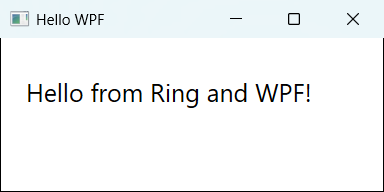
Hello window
The smallest WPF window
ring samples/UsingDotNet/Wpf/01_hello_window.ringSource code
# The smallest WPF window

load "dotnet.ring"

using {
	"System.Windows"
	"System.Windows.Controls"
	"System.Windows.Controls.Primitives"
	"System.Windows.Media"
	"System.Windows.Shapes"
	"System.Windows.Data"
	"System.Windows.Threading"
	"System"
}

oWindow = wpfWindow("Hello WPF",320,160)
oPanel = new StackPanel()
oWindow.Content = oPanel
oText = new TextBlock() {
	Text = "Hello from Ring and WPF!"
	FontSize = 20
	Margin = new Thickness(20,30,20,0)
}
oPanel.Children.Add(oText)

wpfRun(oWindow)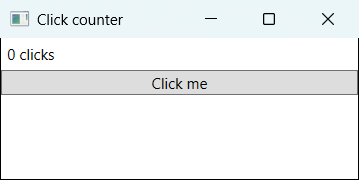
Button click
A button counts its clicks (routed Click event)
ring samples/UsingDotNet/Wpf/02_button_click.ringSource code
# A button counts its clicks (routed Click event)

load "dotnet.ring"

using {
	"System.Windows"
	"System.Windows.Controls"
	"System.Windows.Controls.Primitives"
	"System.Windows.Media"
	"System.Windows.Shapes"
	"System.Windows.Data"
	"System.Windows.Threading"
	"System"
}

nClicks = 0
oWindow = wpfWindow("Click counter",300,150)
oPanel = new StackPanel()
oWindow.Content = oPanel
oInfo = wpfLabel("0 clicks")
oButton = wpfButton("Click me","clicked()")
oPanel {
	Children.Add(oInfo)
	Children.Add(oButton)
}

wpfRun(oWindow)

# --------------------------------------------------------------------------

func clicked

	nClicks++
	oInfo.Content = "" + nClicks + " clicks"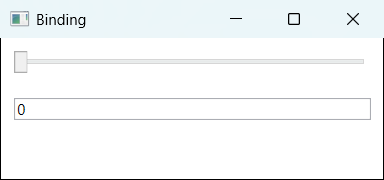
Binding slider
Data binding: the text follows the slider
ring samples/UsingDotNet/Wpf/03_binding_slider.ringSource code
# Data binding: the text follows the slider

load "dotnet.ring"

using {
	"System.Windows"
	"System.Windows.Controls"
	"System.Windows.Controls.Primitives"
	"System.Windows.Media"
	"System.Windows.Shapes"
	"System.Windows.Data"
	"System.Windows.Threading"
	"System"
}

oWindow = wpfWindow("Binding",320,150)
oPanel = new StackPanel()
oWindow.Content = oPanel
oSlider = new Slider() {
	Maximum = 100
	Margin = new Thickness(10,10,10,10)
}
oText = new WpfTextBox()
oText.Margin = new Thickness(10,10,10,10)
oBinding = new WpfBinding().@New([ :path = "Value" ])
oBinding.Source = oSlider
oText.SetBinding(oText.TextProperty,oBinding)
oPanel {
	Children.Add(oSlider)
	Children.Add(oText)
}

wpfRun(oWindow)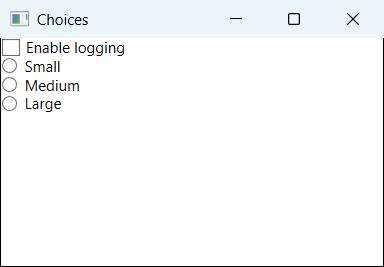
Checkbox radio
Check box and radio buttons with their events
ring samples/UsingDotNet/Wpf/04_checkbox_radio.ringSource code
# Check box and radio buttons with their events

load "dotnet.ring"

using {
	"System.Windows"
	"System.Windows.Controls"
	"System.Windows.Controls.Primitives"
	"System.Windows.Media"
	"System.Windows.Shapes"
	"System.Windows.Data"
	"System.Windows.Threading"
	"System"
}

cLog = ""
oWindow = wpfWindow("Choices",320,220)
oPanel = new StackPanel()
oWindow.Content = oPanel
oCheck = new WpfCheckBox() {
	Content = "Enable logging"
	setCheckedEvent("cLog += 'on '")
	setUncheckedEvent("cLog += 'off '")
}
oPanel.Children.Add(oCheck)
aRadios = []
for cName in ["Small","Medium","Large"]
	oRadio = new WpfRadioButton()
	oRadio.Content = cName
	oPanel.Children.Add(oRadio)
	aRadios + oRadio
next

wpfRun(oWindow)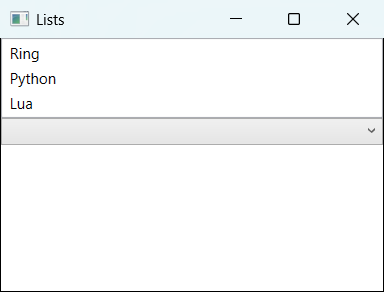
List combo
A list box and a combo box with selection events
ring samples/UsingDotNet/Wpf/05_list_combo.ringSource code
# A list box and a combo box with selection events

load "dotnet.ring"

using {
	"System.Windows"
	"System.Windows.Controls"
	"System.Windows.Controls.Primitives"
	"System.Windows.Media"
	"System.Windows.Shapes"
	"System.Windows.Data"
	"System.Windows.Threading"
	"System"
}

cPicked = ""
oWindow = wpfWindow("Lists",320,240)
oPanel = new StackPanel()
oWindow.Content = oPanel
oList = new WpfListBox()
oCombo = new WpfComboBox()
for cName in ["Ring","Python","Lua"]
	oList.Items.Add(cName)
	oCombo.Items.Add(cName)
next
oList.setSelectionChangedEvent("cPicked = 'list:' + oList.SelectedItem")
oCombo.setSelectionChangedEvent("cPicked = 'combo:' + oCombo.SelectedItem")
oPanel {
	Children.Add(oList)
	Children.Add(oCombo)
}

wpfRun(oWindow)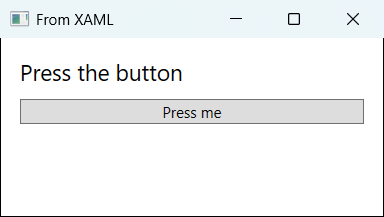
Xaml window
A window described in XAML: parse it, find the named elements, handle events
ring samples/UsingDotNet/Wpf/06_xaml_window.ringSource code
# A window described in XAML: parse it, find the named elements, handle events

load "dotnet.ring"

using {
	"System.Windows"
	"System.Windows.Controls"
	"System.Windows.Controls.Primitives"
	"System.Windows.Media"
	"System.Windows.Shapes"
	"System.Windows.Data"
	"System.Windows.Threading"
	"System"
}

cXaml = '<Window xmlns="http://schemas.microsoft.com/winfx/2006/xaml/presentation" xmlns:x="http://schemas.microsoft.com/winfx/2006/xaml" Title="From XAML" Width="320" Height="180">'
cXaml += '<StackPanel Margin="15"><TextBlock x:Name="message" FontSize="18" Text="Press the button"/>'
cXaml += '<Button x:Name="press" Content="Press me" Margin="0,10,0,0"/></StackPanel></Window>'
oWindow = wpfXaml(cXaml)
oMessage = wpfFind(oWindow,"message")
oPress = wpfFind(oWindow,"press")
oPress.setClickEvent("oMessage.Text = 'The XAML button was pressed'")

wpfRun(oWindow)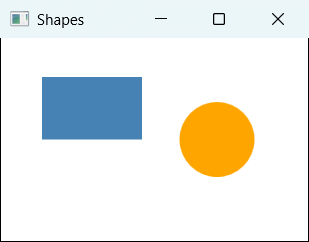
Shapes pixels
Shapes on a canvas, rendered to a bitmap to check the colors
ring samples/UsingDotNet/Wpf/07_shapes_pixels.ringSource code
# Shapes on a canvas, rendered to a bitmap to check the colors

load "dotnet.ring"

using {
	"System.Windows"
	"System.Windows.Controls"
	"System.Windows.Controls.Primitives"
	"System.Windows.Media"
	"System.Windows.Shapes"
	"System.Windows.Data"
	"System.Windows.Threading"
	"System"
	"System.IO"
	"System.Drawing"
	"System.Windows.Media.Imaging"
}

oCanvas = new Canvas() {
	Width = 200
	Height = 120
	Background = wpfBrush("White")
}
oRect = new WpfRectangle() {
	Width = 80
	Height = 50
	Fill = wpfBrush("SteelBlue")
}
oCanvas.Children.Add(oRect)
oCanvas.SetLeft(oRect,10)
oCanvas.SetTop(oRect,10)
oCircle = new Ellipse() {
	Width = 60
	Height = 60
	Fill = wpfBrush("Orange")
}
oCanvas.Children.Add(oCircle)
oCanvas.SetLeft(oCircle,120)
oCanvas.SetTop(oCircle,30)
oWindow = wpfWindow("Shapes",260,200)
oWindow.Content = oCanvas

wpfRun(oWindow)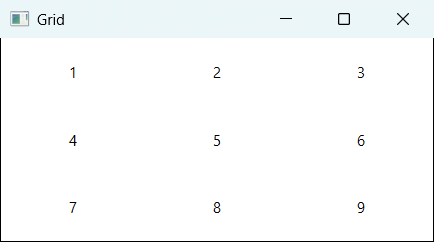
Grid layout
A grid with rows, columns and attached properties
ring samples/UsingDotNet/Wpf/08_grid_layout.ringSource code
# A grid with rows, columns and attached properties

load "dotnet.ring"

using {
	"System.Windows"
	"System.Windows.Controls"
	"System.Windows.Controls.Primitives"
	"System.Windows.Media"
	"System.Windows.Shapes"
	"System.Windows.Data"
	"System.Windows.Threading"
	"System"
}

oWindow = wpfWindow("Grid",360,200)
oGrid = new Grid()
oWindow.Content = oGrid
fillGrid()

wpfRun(oWindow)

# --------------------------------------------------------------------------

func fillGrid

	for nIndex = 1 to 3
		oGrid.RowDefinitions.Add(new RowDefinition())
		oGrid.ColumnDefinitions.Add(new ColumnDefinition())
	next
	for nRow = 0 to 2
		for nColumn = 0 to 2
			oCell = new TextBlock() {
				Text = "" + (nRow * 3 + nColumn + 1)
				HorizontalAlignment = "Center"
				VerticalAlignment = "Center"
			}
			oGrid.Children.Add(oCell)
			oGrid.SetRow(oCell,nRow)
			oGrid.SetColumn(oCell,nColumn)
		next
	next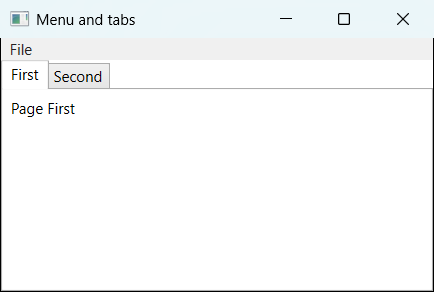
Menu tabs
A menu and tab pages
ring samples/UsingDotNet/Wpf/09_menu_tabs.ringSource code
# A menu and tab pages

load "dotnet.ring"

using {
	"System.Windows"
	"System.Windows.Controls"
	"System.Windows.Controls.Primitives"
	"System.Windows.Media"
	"System.Windows.Shapes"
	"System.Windows.Data"
	"System.Windows.Threading"
	"System"
}

cLast = ""
oWindow = wpfWindow("Menu and tabs",360,240)
oDock = new DockPanel()
oWindow.Content = oDock
oMenu = new Menu()
oFile = new MenuItem()
oFile.Header = "File"
oOpen = new MenuItem() {
	Header = "Open"
	setClickEvent("cLast = 'open'")
}
oFile.Items.Add(oOpen)
oMenu.Items.Add(oFile)
oDock.Children.Add(oMenu)
oDock.SetDock(oMenu,"Top")
oTabs = new WpfTabControl()
for cName in ["First","Second"]
	oTab = new TabItem() {
		Header = cName
		Content = wpfLabel("Page " + cName)
	}
	oTabs.Items.Add(oTab)
next
oDock.Children.Add(oTabs)

wpfRun(oWindow)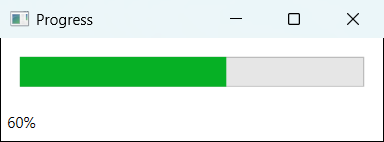
Timer progress
A DispatcherTimer fills a progress bar
ring samples/UsingDotNet/Wpf/10_timer_progress.ringSource code
# A DispatcherTimer fills a progress bar

load "dotnet.ring"

using {
	"System.Windows"
	"System.Windows.Controls"
	"System.Windows.Controls.Primitives"
	"System.Windows.Media"
	"System.Windows.Shapes"
	"System.Windows.Data"
	"System.Windows.Threading"
	"System"
	"System.Diagnostics"
}

nPercent = 0
oWindow = wpfWindow("Progress",320,120)
oPanel = new StackPanel()
oWindow.Content = oPanel
oBar = new WpfProgressBar() {
	Height = 24
	Margin = new Thickness(15,15,15,15)
	Maximum = 100
}
oPanel.Children.Add(oBar)
oText = wpfLabel("0%")
oPanel.Children.Add(oText)
oTimer = new DispatcherTimer() {
	Interval = new TimeSpan().FromMilliseconds(20)
	setTickEvent("advance()")
}
oTimer.Start()

wpfRun(oWindow)
dnAssert("filled",oBar.Value,100)
dnAssert("text",oText.Content,"Done")
wpfEnd()

# --------------------------------------------------------------------------

func advance

	nPercent += 20
	oBar.Value = nPercent
	oText.Content = "" + nPercent + "%"
	if nPercent >= 100
		oTimer.Stop()
		oText.Content = "Done"
		oWindow.Close()
	ok